Choosing a mylar bag label printer is really about consistency: clear labels, fast output, and a setup that fits your packaging volume. Whether you sell food, herbs, supplements, or retail goods, the right printer helps your bags look polished and stay easy to scan.
In this roundup, we focused on practical thermal label printers that can handle everyday shipping and packaging tasks without ink, toner, or complicated maintenance.
Best 10 Mylar Bag Label Printer Picks for 2026
Wireless Mobile-Friendly Option
KNAON Bluetooth Thermal Shipping Label Printer
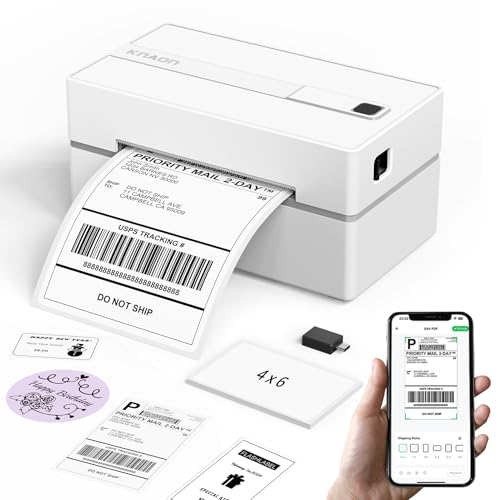
- Bluetooth printing through FlashLabel Pro app
- USB support for Windows, macOS, ChromeOS, Linux
- 3,000+ templates and 100+ fonts for custom labels
Best For: Mobile-first sellers who want flexible DIY label printing
Premium Wi-Fi Thermal Choice
Rollo Wireless Shipping Label Printer

- AirPrint and Wi-Fi support without Bluetooth
- 150 mm/s speed with 203 DPI print head
- Custom labels from 1.57" to 4.1" wide
Best For: Users who want wireless convenience and branded label flexibility
Budget Bluetooth Pick
Mvgges Bluetooth 4x6 Thermal Label Printer

- Bluetooth for Android and iOS via app
- USB support for Windows and Mac
- 203 DPI with up to 160 mm/s speed
Best For: Budget-minded sellers needing simple Bluetooth label printing
Commercial USB Workhorse
Rollo USB Shipping Label Printer

- USB connection for Windows and Mac
- 150 mm/s speed with 203 DPI output
- Works with shipping labels, barcodes, and stickers
Best For: High-volume desktop sellers who want proven thermal reliability
Wireless Bluetooth Shipping Label Printer
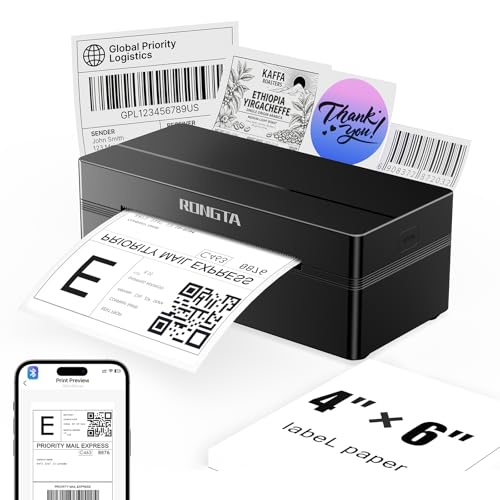
- Bluetooth printing via RLabel app for iOS and Android
- Handles 0.98" to 4.37" label widths, including 4x6
- Compact body with fast 150 mm/s thermal printing
Best For: Compact wireless label printing for shipping and small product labels
Compact Thermal Label Maker

- Inkless thermal printing for simple, low-mess use
- Bluetooth app printing plus USB computer connection
- Supports 4x6 shipping labels and other wide formats
Best For: Small businesses wanting a compact white printer for labels
Wireless Thermal Shipping Printer

- Supports fanfold and roll labels from 1.57" to 4.1"
- Bluetooth on Windows/Mac and app-based mobile printing
- Inkless 203 DPI thermal printing for clean operation
Best For: Sellers who want an easy thermal printer for shipping and product labels
Smart Bluetooth Pick
Arrvel A42BT Bluetooth Thermal Label Printer

- Bluetooth app control for iPhone and Android
- USB support for Windows, macOS, ChromeOS, and Linux
- 203 DPI thermal printing up to 150mm/s
Best For: Small sellers needing flexible, inkless label printing
Compact Value Choice
Rongta Bluetooth Thermal Shipping Label Printer

- Compact 4x6 thermal label printer
- Bluetooth app plus USB computer printing
- Inkless 203 DPI monochrome output
Best For: Light business users wanting a small label printer
High-Speed Workflow Pick
NULLTONEX 4x6 Bluetooth Shipping Printer

- Up to 150mm/s printing speed
- Bluetooth and USB dual connectivity
- Works with major marketplaces and carriers
Best For: Busy sellers who print shipping and product labels fast
Wireless Mobile-Friendly Option – KNAON Bluetooth Thermal Shipping Label Printer
If you want a mylar bag label printer that can handle small-business labeling beyond shipping, the KNAON Bluetooth Thermal Shipping Label Printer is a flexible pick. It supports Bluetooth through the FlashLabel Pro app, USB on multiple desktop platforms, and offers a wide template library for custom labels, barcode labels, thank-you tags, and more.
Best For: Sellers who want a portable label printer with app-based Bluetooth printing and lots of DIY label options.
Pros:
- Supports Bluetooth printing through the FlashLabel Pro app for mobile users
- Works with Windows, macOS, ChromeOS, and Linux via USB
- Includes 3,000+ templates, 5,000+ icons, and 100+ fonts
- Prints at up to 180 mm/s with support for labels up to 4.2 inches wide
Cons:
- Bluetooth cannot be used as a direct device connection; it requires the app
- Some platforms need extra setup, such as drivers or extensions
- Best suited to label printing only, not general document printing
Overall, this is a handy choice if you want one compact printer for shipping labels and custom packaging labels, especially when mobile flexibility matters. Its app-based workflow may take a little setup, but the template variety makes it useful for sellers who want more than basic 4×6 output.
Premium Wi-Fi Thermal Choice – Rollo Wireless Shipping Label Printer
For a mylar bag label printer with simple wireless setup and strong app support, the Rollo Wireless Shipping Label Printer stands out. It prints over Wi-Fi or AirPrint without Bluetooth, and the included Rollo Ship Manager app adds shipping workflows plus custom label-making options for barcodes, QR codes, product labels, and more.
Best For: Sellers who want AirPrint and Wi-Fi convenience with a commercial-style thermal printer.
Pros:
- AirPrint support for iPhone, iPad, and Mac
- Wi-Fi printing for Android, Windows, Chromebook, and Linux
- Fast 150 mm/s print speed with 203 DPI output
- Can make custom labels from 1.57″ to 4.1″ wide
Cons:
- Does not use Bluetooth
- Uses the Rollo Ship Manager app for best shipping workflow benefits
- Focused on labels only, not full document printing
This model is a strong fit if you want reliable wireless label printing and easy compatibility across major devices. It is especially appealing for sellers who want a printer that can handle shipping labels and branded sticker-style labels from the same platform.
Budget Bluetooth Pick – Mvgges Bluetooth 4×6 Thermal Label Printer
If you’re shopping for a mylar bag label printer that keeps setup simple, the Mvgges Bluetooth 4×6 Thermal Label Printer is a practical option. It prints via Bluetooth on Android and iOS using the required apps, or via USB on Windows and Mac, and it supports common sales platforms for small business labeling.
Best For: Small sellers who want an affordable Bluetooth-and-USB thermal label printer for shipping and inventory use.
Pros:
- Bluetooth support for Android and iOS with dedicated printing apps
- USB printing available for Windows and Mac
- 203 DPI resolution and up to 160 mm/s print speed
- Supports label widths from 35 to 104 mm
Cons:
- Bluetooth is limited to Android and iOS only
- No Wi-Fi support
- PC users need to install a driver for USB printing
For straightforward package and label printing, this Mvgges model covers the essentials without extra complexity. It is a good fit if you mainly need a compact thermal printer for online selling platforms and do not need Wi-Fi features.
Commercial USB Workhorse – Rollo USB Shipping Label Printer
If you need a mylar bag label printer built for consistent output, the Rollo USB Shipping Label Printer is a commercial-grade thermal option. It connects by USB to Windows or Mac, prints shipping and custom labels, and works with a wide range of marketplaces and shipping platforms.
Best For: High-volume sellers who want a reliable USB thermal printer for labels and stickers.
Pros:
- USB connectivity with Windows and Mac
- High-speed 150 mm/s thermal printing with 203 DPI resolution
- Supports shipping labels, warehouse labels, barcodes, and sticker labels
- Compatible with major platforms like USPS, FedEx, UPS, Shopify, Etsy, and eBay
Cons:
- No wireless or Bluetooth connectivity
- Requires driver setup on supported computers
- Optimized for label printing only
This is the strongest pick for sellers who care more about dependable throughput than wireless features. If your workflow is mostly desktop-based and you want a label printer that can handle shipping plus custom branding labels, it is a proven choice.
Wireless Bluetooth Shipping Label Printer – Rongta RP425 Portable 4×6
If you need a mylar bag label printer that can also handle shipping and barcode work, the Rongta RP425 is a practical low-friction pick. It supports Bluetooth printing from iOS and Android through the RLabel app, and it also offers USB setup for Windows, Mac, and Chrome OS when you want a desktop workflow.
Best For: Sellers who want a compact wireless thermal printer for 4×6 labels and smaller product labels.
Pros:
- Supports label widths from 0.98″ to 4.37″, including 4×6 shipping labels and small round or barcode labels.
- Bluetooth printing works with iPhone, iPad, and Android devices through the RLabel app.
- Compact 10.2 x 7.4 x 5.3-inch design is easy to store on a desk or take along.
- Fast thermal printing up to 150 mm/s with 203 dpi output.
Cons:
- Phone printing depends on the RLabel app rather than direct system printing.
- It is a monochrome direct thermal printer, so it is not for color labels.
- Best suited to direct thermal media only.
Overall, the RP425 is a flexible budget-friendly option if you want one printer for shipping labels and smaller mylar bag style labels. Its mix of mobile Bluetooth use and desktop USB compatibility makes it easy to fit into a small business setup.
Compact Thermal Label Maker – Rongta RP425 White
For a mylar bag label printer that stays simple and space-saving, this Rongta RP425 model is built around inkless thermal printing and easy wireless use. It supports Bluetooth printing from phones through the RLabel app and USB printing from Windows or Mac computers, making it a straightforward option for small business labeling.
Best For: Home and small business sellers who want a compact white thermal printer for shipping and product labels.
Pros:
- Wireless Bluetooth printing through the RLabel app for mobile devices.
- USB computer setup for Windows, macOS, laptops, PCs, smartphones, and tablets.
- Inkless thermal printing keeps operation simple and low-mess.
- Supports 4×6 labels and other wide label sizes for shipping and small business use.
Cons:
- Phone printing relies on the RLabel app.
- Monochrome output only.
- Much of the listing focuses on shipping labels rather than specialty packaging workflows.
This model makes sense if you want a clean, compact printer with the basics covered and don’t need advanced label features. It’s a strong fit for simple mylar bag labels, shipping labels, and everyday small business use.
Wireless Thermal Shipping Printer – JADENS JD268BT Blue
If you want a mylar bag label printer that can also handle marketplace shipping labels, the JADENS JD268BT is designed for simple thermal printing with broad platform support. It works wirelessly on Windows and Mac through Bluetooth, and Android or iOS users can print through the Jadens Printer app.
Best For: Small online sellers who need a dependable thermal printer for shipping and product labels.
Pros:
- Supports both fanfold and roll labels with widths from 1.57″ to 4.1″.
- No ink or toner required, which keeps printing clean and economical.
- Works with Windows, Mac, Android, and iPhone, with Bluetooth or USB options depending on device.
- Built for label printing across major marketplaces and shipping platforms.
Cons:
- Mobile printing requires the Jadens Printer app.
- You need to calibrate label size when changing label types.
- It is a monochrome 203 DPI printer, so it is not meant for color packaging.
The JD268BT is a solid all-around choice if you want a straightforward printer for shipping labels and small-format product labels like mylar bags. Its broad compatibility and low-maintenance thermal system make it easy to work into a growing shop.
Smart Bluetooth Pick – Arrvel A42BT Bluetooth Thermal Label Printer
If you need a mylar bag label printer for shipping, barcodes, or custom product stickers, the Arrvel A42BT is built around fast thermal printing and flexible connectivity. It supports Bluetooth through the FlashLabel Pro app on iPhone and Android, plus USB use on Windows, macOS, ChromeOS, and Linux, making it a practical option for mixed-device workflows.
Best For: Small sellers who want a wireless label printer for shipping labels, custom labels, and multi-device use.
Pros:
- Direct thermal printing means no ink or toner to buy.
- Supports 4×6 labels and widths from 1.57″ to 4.3″.
- Fast printing up to 150mm/s with 203 DPI clarity.
- App includes AI Smart Cropping plus 3,000+ templates and 100+ fonts.
Cons:
- Mobile and macOS Bluetooth printing requires the FlashLabel Pro app, not system Bluetooth settings.
- Built for monochrome output only.
Overall, this model stands out if you want a versatile mylar bag label printer that can also handle shipping workflows and DIY product labeling without extra consumables. The included stand and broad platform support make it especially useful for small businesses that print often.
Compact Value Choice – Rongta Bluetooth Thermal Shipping Label Printer
The Rongta RP425A is a straightforward mylar bag label printer option if you mainly need a compact thermal unit for 4×6 shipping labels and simple product labeling. It offers Bluetooth printing through the Rongta app on phones and USB printing on computers, with inkless thermal output for sharp, monochrome labels.
Best For: Sellers who want a small, easy-to-use thermal printer for shipping labels and basic label making.
Pros:
- Very compact design that fits easily on a desk.
- Bluetooth and USB connectivity for phone or computer use.
- Supports 4×6 labels and multiple-size wide printing.
- Inkless thermal printing with 203 DPI resolution.
Cons:
- Basic feature set compared with app-heavy rivals.
- Printer output is monochrome only.
This is a solid pick when you want a no-frills mylar bag label printer that keeps setup simple and focuses on core label printing tasks. Its small footprint and app-based workflow make it appealing for home offices and light business use.
High-Speed Workflow Pick – NULLTONEX 4×6 Bluetooth Shipping Printer
For a mylar bag label printer that can also keep up with shipping volume, the NULLTONEX model focuses on speed, app-based editing, and dual Bluetooth/USB connectivity. It prints in direct thermal 203 DPI, supports 4×6 labels and other widths up to 4.3 inches, and is designed for quick setup with the FlashLabel Pro app.
Best For: Busy small businesses that need fast, inkless label printing for shipping and product packaging.
Pros:
- Fast output up to 150mm/s, or 72 labels per minute.
- Bluetooth and USB options for phone, laptop, or PC.
- Works with Amazon, Shopify, Etsy, USPS, UPS, FedEx, and DHL.
- App offers 1,800+ templates, 300+ fonts, and offline storage.
Cons:
- Prints black and white only.
- Best suited to label workflows rather than broader office printing.
If you need a mylar bag label printer that doubles as a fast shipping workhorse, this model is built for volume and convenience. The combination of speed, app tools, and broad platform support makes it a practical choice for sellers who print labels every day.
How We Picked These Mylar Bag Label Printer Options
We prioritized models that are easy to set up, work well with common e-commerce and shipping workflows, and produce crisp labels at the sizes most sellers need for bags and packages. For a Mylar Bag Label Printer, that means dependable Bluetooth or wireless connectivity, good app support, and enough speed for batch labeling.
We also looked for printers that reduce operating costs by using direct thermal technology, since that keeps ongoing expenses low and simplifies day-to-day use.
Quick Comparison
Most buyers will be choosing between portable Bluetooth models, wireless desk printers, and more commercial-grade units. Portable options are best for low-to-moderate label volume and flexible workspaces. Wireless or Wi-Fi models are ideal if multiple devices need access. Higher-speed commercial printers are the better fit if you label in batches or print all day.
Key Buying Factors for a Mylar Bag Label Printer
Label Size and Print Quality
Make sure the printer supports the label width you need for your bags, whether that is compact product labels or larger shipping-style labels. Crisp print quality matters for barcodes, ingredient details, and branding elements that need to stay readable.
Connectivity and Device Compatibility
Check whether the printer supports iPhone, Android, Windows, Mac, or browser-based printing. If you work from multiple devices, a wireless model can be more convenient than USB-only setup. If you want simple, stable operation from one workstation, USB may be enough.
Throughput and Workflow
If you print labels one at a time, a smaller Bluetooth unit may be perfect. If you fulfill orders or pack inventory in batches, choose a faster model with a stronger feed path and better long-session reliability.
Cost of Ownership
Direct thermal printers avoid ink and toner, but you should still check label roll costs, replacement parts, and software limitations. The best long-term value usually comes from a printer that is easy to source labels for and simple to maintain.
Who Should Buy Which Mylar Bag Label Printer?
Solo sellers and home-based brands should look for compact Bluetooth models that are easy to move and quick to pair. Growing shops that need shared access should consider Wi-Fi or wireless printers. If you run a higher-volume operation, a commercial-grade model is usually the smarter choice for speed, durability, and fewer interruptions.
If your goal is a reliable Mylar Bag Label Printer for professional-looking packaging, focus on compatibility, print clarity, and ease of use first. Those three factors usually matter more than extra features you may never use.