A freezer can warm up long before you notice a problem. A temperature alarm gives you a chance to act before stored food is lost, whether you need a simple alert at home or remote notifications while you’re away.
These 10 options cover local displays, Wi-Fi alerts, multi-sensor kits, and longer-range systems. The right choice depends on where your freezer sits, how quickly you need to hear about a temperature rise, and whether you want a record of past readings.
Best 10 Freezer Temp Alarm Picks for 2026
Best for App-Based Tracking
GoveeLife WiFi Thermometer 2-Pack with LCD

- Two sensors with LCD readouts
- App alerts with adjustable delay
- Two years of exportable data
Best For: Remote monitoring of two appliances without a local buzzer
Best Two-Freezer Audible Kit

- Two sensors and a gateway
- 80 dB, app, and email alerts
- Gateway supports up to 10 sensors
Best For: Audible and remote alerts for two appliances
Best Single-Freezer Smart Alarm
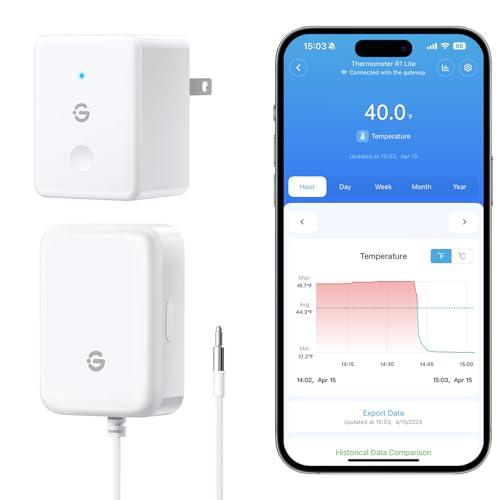
- One sensor and gateway included
- 80 dB, app, and email alerts
- Expandable gateway supports 10 sensors
Best For: One freezer with audible and remote alerts
Best Display-Based Fridge and Freezer Kit
AcuRite 00515M Wireless Thermometer

- Separate fridge and freezer sensors
- Customizable temperature alarms
- Versatile LCD mounting options
Best For: Dedicated on-site fridge and freezer monitoring
Best for Expandable Monitoring
MOCREO WiFi Freezer Alarm with Two Sensors

- Two included remote sensors
- App, email, and 90 dB hub alerts
- Up to two years of free CSV exports
Best For: Multiple cold-storage spaces with room to expand
Best for Outlet-Saving Setup
MOCREO WiFi Thermometer with Pass-Through Hub

- Hub preserves access to its wall outlet
- App, email, and 80 dB buzzer alerts
- Power-outage and restoration notifications
Best For: Remote monitoring where outlet space is limited
Best for At-Home Readability
Wireless Fridge Freezer Thermometer with Alarm

- Two sensors; stated 330-foot range
- Large color display with humidity readings
- Customizable local alarm up to 90 dB
Best For: At-home monitoring without an app
Best for Two Freezers
MOCREO H5Lite WiFi Freezer Alarm

- Two slim-cable temperature probes
- App, email, and 80dB hub alerts
- Two-year CSV export; no subscription fee
Best For: Monitoring two cold-storage compartments with an LCD hub
Best for Distant Locations

- Up to 1,640-foot open-air range
- Two IP66 splash-resistant sensors
- Push, email, and 95dB hub alerts
Best For: Distant fridges, RVs, and other locations needing long-range monitoring
Best for Three Locations
YoLink LoRa Freezer Sensor Kit

- Hub plus three sensors included
- Up to 2,034-foot open-air range
- Custom push, email, and limited SMS alerts
Best For: Monitoring three temperature-sensitive locations from one kit
Best for App-Based Tracking – GoveeLife WiFi Thermometer 2-Pack with LCD
This freezer temp alarm kit monitors two appliances through slim probes and sends out-of-range alerts to the GoveeLife app. Each sensor has an LCD for checking its reading without opening the app, but the device itself does not sound an alarm.
Best For: Monitoring two fridges or freezers remotely when phone alerts and temperature history matter more than a local buzzer.
Pros:
- Includes two sensors and a WiFi gateway that supports up to 10 sensors.
- Adjustable 1–10-minute alert delay helps avoid alerts from brief temperature changes.
- Offers two years of viewable and exportable temperature data without a subscription fee.
Cons:
- No audible alarm on the device.
- Remote app alerts require the gateway and 2.4 GHz WiFi.
Choose this version if you want an at-a-glance LCD alongside remote tracking. If someone nearby needs to hear an alarm, consider a model with a built-in buzzer instead.
Best Two-Freezer Audible Kit – GoveeLife WiFi Alarm 2-Pack
If you need a freezer temp alarm that can be heard at home as well as checked remotely, this two-sensor GoveeLife kit offers 80 dB buzzers, app notifications, and email alerts when temperatures leave your preset range.
Best For: Households monitoring two fridges or freezers that want both audible and remote warnings.
Pros:
- Includes two probe-equipped sensors and a gateway.
- Provides buzzer, app, and email alerts.
- Gateway supports up to 10 sensors within a stated range of up to 230 feet.
Cons:
- Requires 2.4 GHz WiFi for gateway connectivity.
- Silencing an active buzzer requires pressing the sensor’s side button, unless the buzzer is set to mute.
This is the stronger fit than an app-only kit when an audible warning is important. Its included pair covers two locations, with room to add compatible sensors later.
Best Single-Freezer Smart Alarm – GoveeLife WiFi Alarm 1-Pack
This one-sensor freezer temp alarm pairs a probe-equipped monitor with a WiFi gateway. It can warn you through an 80 dB buzzer, app notification, or email when the temperature crosses your preset limit.
Best For: Starting with one freezer while keeping the option to add more sensors to the gateway.
Pros:
- Combines an audible buzzer with remote app and email alerts.
- Measures from -40°F to 158°F with stated ±0.9°F accuracy.
- Gateway supports up to 10 sensors within a stated range of up to 230 feet.
Cons:
- Only one sensor is included.
- Requires 2.4 GHz WiFi; an active buzzer must be silenced with the side button unless muted in settings.
Pick this package when you have one appliance to cover now. It provides the same alert types listed for the two-sensor kit without buying a second sensor upfront.
Best Display-Based Fridge and Freezer Kit – AcuRite 00515M Wireless Thermometer
For a freezer temp alarm centered on an easy-to-read kitchen display, the AcuRite 00515M includes separate wireless sensors for a fridge and a freezer. Its customizable temperature alarms can flag spikes from an open door or a struggling appliance.
Best For: Checking fridge and freezer readings on a dedicated display rather than relying on a phone app.
Pros:
- Includes one fridge sensor and one freezer sensor.
- LCD can be mounted magnetically, hung on a wall, or placed on a counter.
- Customizable alarms and max/min temperature readings add useful context.
Cons:
- Supplied information does not list app access or remote notifications.
- Requires seven AA batteries.
The dedicated display makes this a practical choice for a kitchen where people regularly pass by the fridge. Choose a WiFi model instead if checking temperatures away from home is essential.
Best for Expandable Monitoring – MOCREO WiFi Freezer Alarm with Two Sensors
This freezer temp alarm pairs two remote sensors with a Wi-Fi hub, letting you check temperatures and receive alerts when a freezer moves outside your chosen range. It suits households that want to monitor more than one cold-storage space from an app.
Best For: Monitoring two freezers or a fridge and freezer now, with room to add compatible sensors later.
Pros:
- App, email, and 90 dB hub alerts provide multiple ways to catch a temperature problem.
- The hub supports up to 30 compatible MOCREO sensors within a stated 230-foot range.
- Exports up to two years of temperature data to CSV without a subscription.
- Thin probe cables pass through door seals, and the hub buzzer can be muted from the app.
Cons:
- Requires 2.4 GHz Wi-Fi for remote monitoring.
- Additional sensors are needed to use the hub’s full capacity.
Its expansion options and record export make it a practical pick if your monitoring needs may grow. For a simpler local-only alarm, a Wi-Fi hub may be more setup than you need.
Best for Outlet-Saving Setup – MOCREO WiFi Thermometer with Pass-Through Hub
This freezer temp alarm includes two sensors and a hub with a pass-through outlet, so installing it need not take a wall socket out of use. App and email notifications complement the hub’s audible alarm for remote and at-home monitoring.
Best For: Kitchens or garages where outlet space is limited and power-outage notifications matter.
Pros:
- Pass-through hub keeps its wall outlet available and can manage up to 30 sensors.
- App, email, and 80 dB buzzer alerts cover both remote and local monitoring.
- Sends app and email power-outage alerts within 25 minutes, according to the supplied notes, plus a restoration alert.
- Adjustable alert delay helps filter routine door openings or defrost cycles; two years of data can be stored and exported for free.
Cons:
- Supports 2.4 GHz Wi-Fi only.
- Power-outage notification is specified as arriving within 25 minutes, not immediately.
The outlet design is the standout difference here. Choose it when a nearby socket is scarce, while allowing for the stated delay in outage alerts.
Best for At-Home Readability – Wireless Fridge Freezer Thermometer with Alarm
If you want a freezer temp alarm you can read across the room, this model pairs two wireless sensors with a large color display. It sounds a local alarm when a sensor exceeds your preset temperature range, without relying on an app.
Best For: Checking fridge and freezer readings at home on a dedicated display.
Pros:
- Includes two sensors with a stated wireless range of up to 330 feet and readings updated every 30 seconds.
- Customizable temperature alerts sound at up to 90 dB for one minute.
- Large display also shows humidity, 24-hour maximum and minimum readings, and trend arrows.
- USB power supports a constant, adjustable backlight.
Cons:
- No app, email, or remote notifications are specified.
- AAA batteries for battery operation are not included.
- On battery power, the backlight turns off after 10 seconds.
This is the straightforward choice for visible readings and an audible alert in the home. If you need to hear about a problem while away, consider a model with remote notifications instead.
Best for Two Freezers – MOCREO H5Lite WiFi Freezer Alarm
This freezer temp alarm pairs two slim-cable probes with an LCD hub, making it practical for monitoring two freezers or a fridge and freezer without opening their doors. Set temperature limits in the app to receive push and email alerts alongside an 80dB hub alarm.
Best For: Households that want probe-based monitoring for two cold-storage compartments and an at-a-glance display.
Pros:
- Probes measure from -40°F to 158°F with stated ±0.9°F accuracy; thin cables pass through door seals.
- Hub shows readings and trends, and its beep can be muted remotely in the app.
- Offers two years of CSV data export without a subscription fee.
Cons:
- Hub supports only 2.4GHz Wi-Fi.
- Its stated 230-foot sensor range is for open areas, so placement may take planning.
Choose this model if keeping the sensing hardware outside the freezer matters to you: the probes sit inside while the wireless sensors remain accessible. The included pair makes it a focused setup for two compartments, with room to add compatible sensors later.
Best for Distant Locations – MOCREO H5Pro Long-Range Alarm
This freezer temp alarm kit emphasizes range: its H5Pro hub connects to two IP66 splash-resistant wireless sensors at up to 1,640 feet in open air. The LCD hub and app let you check readings and trends, while push, email, and a 95dB hub beep provide alert options.
Best For: Monitoring a garage fridge, RV, or other distant location where a conventional short-range sensor may struggle.
Pros:
- Long stated open-air range and support for up to 100 sensors on the hub.
- IP66 splash-resistant sensors suit humid locations.
- Two years of CSV data export are available without a subscription.
Cons:
- Sensors measure down to -4°F, so they are not suited to tracking temperatures below that point.
- Fully enclosed metal containers and thick freezer doors can interfere with the wireless signal.
The long-range link is the reason to pick this kit, but freezer construction matters as much as distance. Check where you can place a sensor reliably before depending on alerts from a metal-enclosed compartment.
Best for Three Locations – YoLink LoRa Freezer Sensor Kit
This freezer temp alarm kit includes a hub and three sensors, so you can set separate temperature thresholds across multiple locations from the start. Its LoRa sensor connection avoids adding devices to your Wi-Fi network and has a stated open-air range of up to 2,034 feet.
Best For: Buyers monitoring three fridges, freezers, or other temperature-sensitive spaces with app-based alerts.
Pros:
- Includes three sensors and one hub.
- Custom thresholds can trigger push, email, or text alerts; Apple Critical Alerts are supported.
- Sensors use two AA batteries each, with a stated life of up to five years depending on conditions.
Cons:
- Measurement range bottoms out at -4°F.
- Free SMS messages are limited; the stated allowance for a hub and one sensor is 15 per month.
YoLink is appealing when coverage across several spots matters more than a hub-mounted readout. Its included sensor count and long-range link make it flexible, but check the temperature floor and SMS allowance against your monitoring needs.
How We Picked These Freezer Temp Alarms
We focused on practical differences that affect day-to-day monitoring: how alerts reach you, how many freezers one kit can cover, whether readings are visible without opening an app, and whether the system stores temperature history. We also considered connectivity needs, including wireless range and what happens when Wi-Fi or power goes out. Feature descriptions are a starting point, not a substitute for checking the current listing’s sensor temperature range, alert options, and included hardware.
Quick Comparison: Which Type Fits Your Setup?
For a nearby freezer, a wireless thermometer with a room display and audible alarm can be straightforward to use. The AcuRite model and the 330-foot wireless option fit that general approach. If you want phone alerts when you are away, compare the GoveeLife Wi-Fi kits and MOCREO systems. The listed GoveeLife options include one- and two-sensor configurations, with an LCD display on one two-pack; check which version you are buying.
MOCREO’s listed kits offer different combinations of app and email alerts, display hubs, data export, longer-range sensors, and a pass-through outlet hub with power-outage alerts. The YoLink kit supplies three sensors and a hub, making it worth considering when you need to watch several locations. Confirm each kit’s exact capabilities before choosing based on a single feature.
Key Buying Factors for a Freezer Temp Alarm
Alerts You Will Actually Notice
Decide whether an audible alarm at home is enough or whether you also need app or email notifications. Look for adjustable high-temperature thresholds and, if available, alert delays that can prevent a brief door opening from triggering a warning. Test notifications after setup; phone settings can silence an otherwise working alarm.
Sensor Placement and Wireless Connection
Freezer walls, closed doors, distance, and building materials can weaken a wireless signal. Check the stated operating temperature for the sensor and test reception with the door shut. Place the sensor where it represents stored food temperatures without blocking the door seal. If a system uses a probe, follow its instructions for routing the cable safely.
Power, History, and Ongoing Costs
Check sensor battery requirements and how the hub or display is powered. App-based alerts generally depend on a working network and power, so consider whether a local buzzer or power-outage alert matters to you. Temperature logs can help you spot recurring problems; verify how long data is retained, whether it can be exported, and whether any feature requires a subscription.
Who Should Buy Which Freezer Temp Alarm?
Choose a local-display alarm if someone is usually within earshot and you want simple monitoring. Pick a Wi-Fi kit if you need alerts away from home; start with the number of sensors your setup needs rather than paying for unused capacity. Consider a system with history or export tools for valuable stock or recurring temperature checks. For multiple or distant freezers, prioritize enough sensors and a reliable connection over extra app features. Whichever Freezer Temp Alarm you choose, test a high-temperature alert and set a routine for checking its batteries and connection.